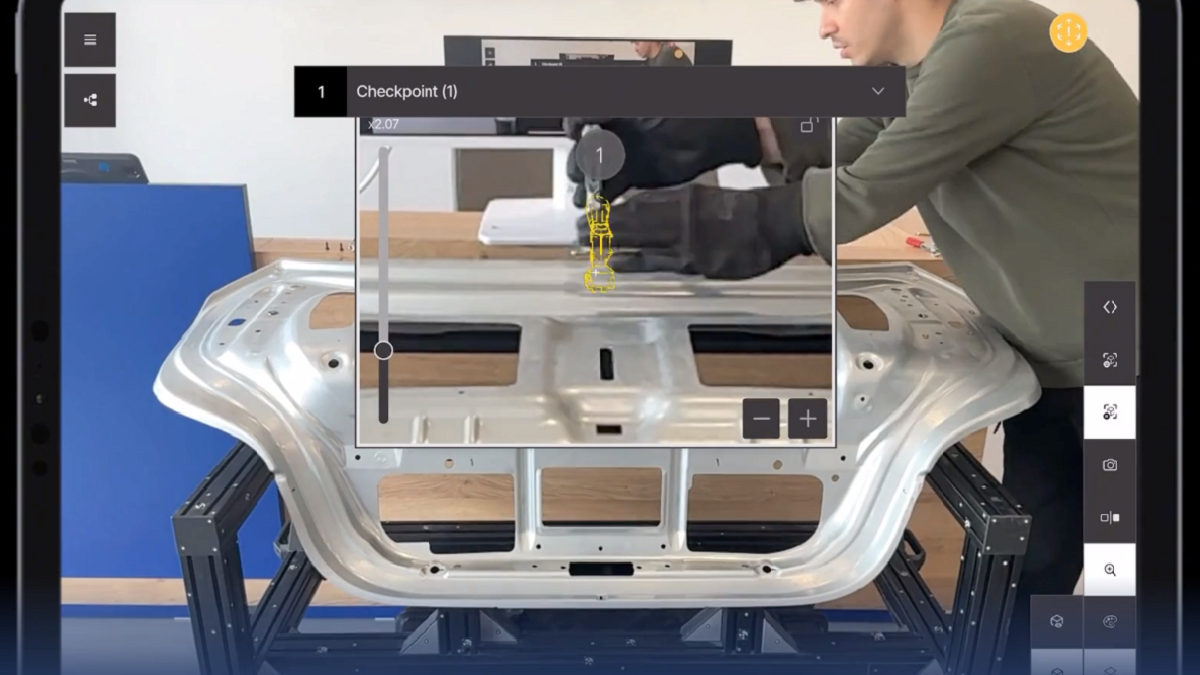
SuPAR Brings Step-by-Step AR Assembly Guidance Directly to the Shop Floor
Stages and Navigation connect digital assembly sequences with physical components, helping operators see what to position, where to place it, and which step comes next.
SuPAR, the augmented reality solution, is showcasing how its Stages and Navigation capabilities bring CAD-based assembly guidance directly into the production environment. By displaying the relevant digital components over the physical assembly, SuPAR helps operators follow a defined sequence with visual guidance at the point of work.
Complex assembly tasks require operators to understand both the final configuration and the steps needed to achieve it. Translating drawings or on-screen models into actions on a physical component can demand considerable interpretation. SuPAR addresses this challenge by bringing the digital model into the operator’s view of the actual assembly.
With Stages, users can display the components relevant to a specific assembly step. As they move through the sequence, the AR view changes to reflect the corresponding stage. This makes it easier to understand the relationship between individual components, their intended positions, and the assembly as a whole.
Navigation adds guided checkpoints to this process. Operators can follow instructions associated with each step while viewing highlighted locations on the physical assembly. Together, Stages and Navigation connect the assembly sequence, the digital geometry, and the task being performed.
The accompanying PDMU assembly demonstration shows this workflow in practice. An operator progresses through a sequence of clamp-positioning steps around a physical metal component. Digital overlays indicate the relevant clamp positions, while checkpoint instructions guide the operator through the task. The demonstration illustrates how SuPAR can turn CAD information into practical visual support for assembly work.
This combination gives manufacturing teams a way to make assembly instructions more accessible and repeatable. By showing the relevant information in its physical context, the workflow can help reduce ambiguity, support consistent execution, and make complex procedures easier to learn and follow.
The capability also extends SuPAR’s role beyond visual quality inspection. Digital geometry can support operators during assembly itself, connecting design intent with shop-floor execution. For manufacturers managing complex parts and multi-step processes, this creates an opportunity to use the same CAD data as an active guide throughout the workflow.
For more information: www.supar.tech