ABViewer 16 Elevates Digital Inspection and CAD Data Preparation
CADSoftTools has released ABViewer 16, delivering one of the most comprehensive updates the platform has seen in recent years. The new version strengthens ABViewer’s role as a versatile tool for engineers, designers, and manufacturing professionals by expanding capabilities across 3D visualization, 2D editing, PDF-to-CAD conversion, and G-code generation.
The latest release places strong emphasis on improving the accuracy, efficiency, and user experience of working with complex CAD data. From enhanced import/export workflows to upgraded analytical tools and more intuitive editing features, ABViewer 16 raises the bar for an all-in-one CAD viewer and editor.
Advances in 3D Viewing, Measurement, and Export
ABViewer 16 introduces substantial improvements to 3D model handling. The import of STEP, SLDPRT, X_T, X_B, and ACIS formats has been refined to increase processing reliability and visual fidelity, while exports to STEP and ACIS have also been enhanced.
New view alignment tools allow users to orient models more quickly: ‘Normal to’ aligns the view perpendicular to a selected face, while ‘Normal to an entity’ both aligns and fits the selected face to the view area. An additional ‘Invert view’ option helps users analyze geometry from the opposite direction with a single click.
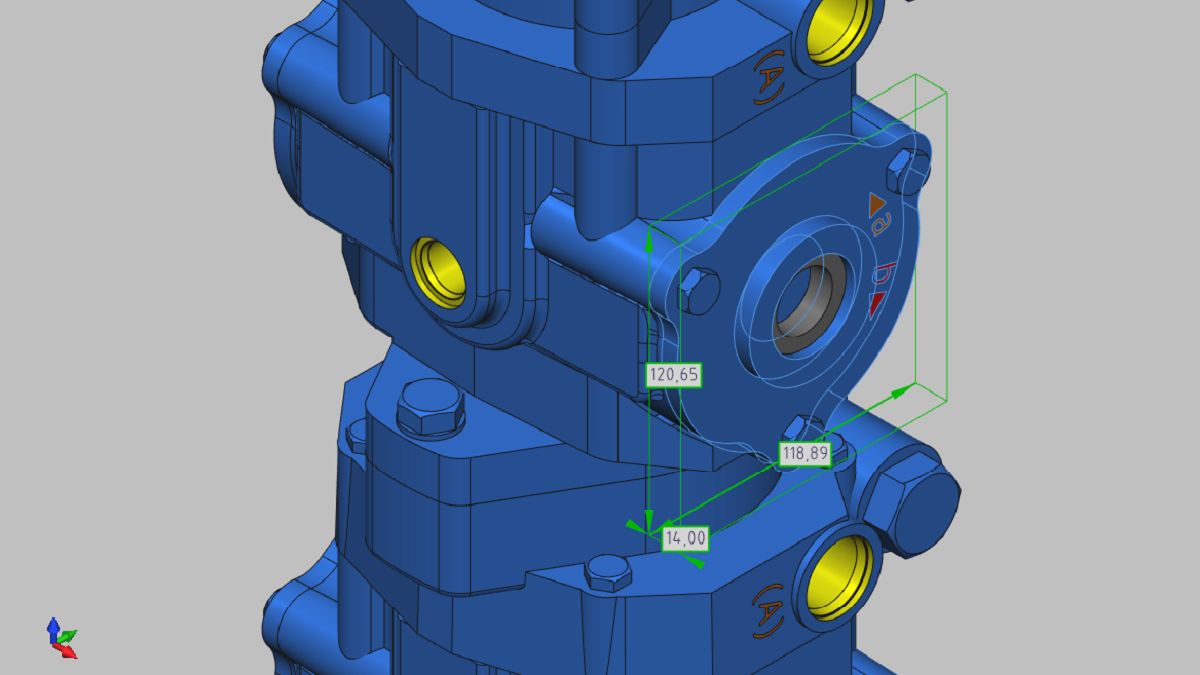
The Bounding Box tool has been upgraded to support both Axis-Aligned and Oriented Minimum Bounding Box calculations. Users can now extract overall dimensions for an entire model or isolate individual solids or faces for localized measurement. A newly added total measurement calculation feature further strengthens ABViewer’s utility for dimensional analysis and inspection.
Refinements to 2D Drawing Import, Export, and Measurement
In 2D workflows, ABViewer 16 offers expanded format support with new exports to DWG and DXF 2010, 2013, and 2018, while imports of DWG, DXF, DWF, HPGL, and SVG are now more reliable. Export quality for DWG, DXF, SVG, and PDF has been improved to deliver cleaner, more precise output suitable for downstream CAD or documentation use.
The updated 2D measurement tools provide a smoother, more accurate measuring experience. Users now benefit from additional contextual measurement information, supporting better decision-making in drawing analysis and verification.
Higher-Quality PDF to DWG/DXF Conversion
PDF conversion has been strengthened to deliver more faithful, editable CAD drawings from PDF input. New settings allow transparency to be preserved in fills, and users may now choose to run conversion through the Save As dialog for a streamlined workflow. Automatic opening of the converted file provides a more fluid, time-saving experience for those processing multiple documents.
Expanded G-Code Generation for CNC Preparation
For manufacturing users, ABViewer 16 includes notable enhancements to its G-code generation engine. A new Create Pocket tool enables pockets of any shape to be generated directly from selected contours, making it easier to prepare CAD geometry for CNC machining.
Additional options allow coordinates to be rounded to a chosen multiple, improving compatibility with machine control requirements. Support for incremental positioning (G91) has also been added, providing greater flexibility for CNC programming workflows.
Improved Editor Mode for CAD Creation and Adjustment
Editor Mode, a core component of ABViewer, receives several new tools that improve both drafting precision and editing efficiency. The new Offset tool simplifies the creation of concentric shapes or parallel boundaries. A Polygon tool supports inscribed, circumscribed, and edge-defined polygons, broadening geometric construction capabilities.
The Coordinate Points tool adds the ability to place points at exact coordinates, automatically connect them with lines, and import or export point lists in TXT and CSV formats—a valuable feature for survey, inspection, and reverse-engineering workflows. Geometric center snapping has been expanded to include symbol visualization for closed polylines.
Viewport creation has also been redesigned: users can now insert a viewport by selecting a region of a drawing and placing it into a layout with a custom scale. Navigation within viewports has been improved as well, allowing more fluid movement through complex drawing sets.
A new grid configuration option gives users greater control over drafting environments, while further visualization adjustments—such as customizable display border width—help tailor ABViewer to individual preferences or project needs.
Performance, Stability, and Platform Enhancements
ABViewer 16 includes a range of under-the-hood improvements, including better performance and stability, particularly for users running the software under Wine. Numerous bug fixes further refine everyday usability.
With its combination of advanced viewing tools, improved conversion technologies, and expanded CAD/CAM features, ABViewer 16 stands out as a powerful, flexible solution for professionals working with 2D and 3D engineering data across design, manufacturing, and inspection environments.
For more information: www.cadsofttools.com